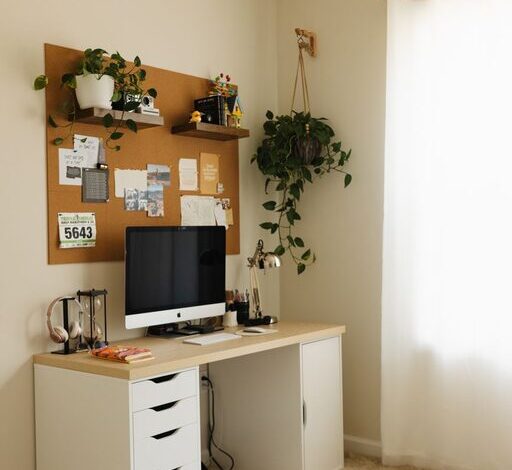

Tips for Creating a Cozy and Productive Home Office Space
Creating a home office that feels cozy while also fostering productivity can be a rewarding project. Whether you’re working remotely full-time or occasionally need a quiet spot to focus, your workspace plays a big role in how you feel and perform throughout the day. Here are some helpful tips to guide you in designing a home office that’s both inviting and efficient.
Choose the Right Location
Find a Quiet Spot
Select a space in your home with minimal distractions and noise. This could be a spare bedroom, a corner in the living room, or even a nook near a window. The goal is to have a dedicated area where you can concentrate without interruptions.
Consider Natural Light
If possible, position your desk near a window. Natural light helps improve mood, reduces eye strain, and can make your workspace feel more open and lively. If natural light is limited, opt for bright, comfortable artificial lighting instead.
Prioritize Comfort and Ergonomics
Invest in a Comfortable Chair
A supportive, adjustable chair is key for long hours of sitting. Look for options that support your lower back and encourage good posture.
Use an Ergonomic Desk Setup
Keep your monitor at eye level to avoid neck strain, and arrange your keyboard and mouse so your wrists stay straight. Height-adjustable desks can be a great choice if you want flexibility between sitting and standing.
Create a Cozy Atmosphere
Add Soft Textures
Incorporate cushions, a throw blanket, or a soft rug to make your space feel warm and inviting. These touches can reduce the feeling of sterility and add personality.
Choose Calming Colors
Opt for a color palette that soothes you and helps maintain focus. Soft blues, greens, or neutral tones are popular choices for a calming environment.
Include Personal Touches
Display a few meaningful items like photos, plants, or artwork. These elements can boost your mood and make your office feel uniquely yours without cluttering the space.
Organize Efficiently
Use Storage Solutions
Keep your desk clear by using shelves, drawers, or organizers for office supplies and paperwork. This reduces clutter, which can otherwise distract and overwhelm.
Establish a Filing System
Whether digital or physical, a reliable system for managing documents saves time and keeps your workflow smooth.
Limit Distractions
Put away non-work-related items and turn off notifications from your phone or computer when it’s time to focus.
Maximize Productivity with Smart Tools
Choose the Right Technology
Make sure your computer, internet connection, and any other equipment meet your work needs. Investing in good technology can save frustration and increase efficiency.
Use a Planner or Digital Calendar
Keep track of tasks, meetings, and deadlines to stay organized and manage your time effectively.
Incorporate Break Reminders
Use timers or apps to remind yourself to take regular breaks. Short pauses can help maintain focus and prevent burnout.
Maintain a Healthy Work-Life Balance
Set Clear Boundaries
Define your work hours and stick to them. Closing the office door or packing up your materials at the end of the day signals the transition from work time to personal time.
Schedule Movement Breaks
Incorporate stretches or brief walks during your day to refresh your body and mind.
Keep Your Space Clean
Spend a few minutes each day tidying your workspace to maintain a pleasant environment that invites you to work.
Final Thoughts
Designing a home office that blends coziness with productivity is all about balance. By carefully selecting your location, optimizing comfort, organizing efficiently, and adding personal touches, you can create a space that supports your best work while feeling welcoming. A thoughtfully designed home office can make remote work more enjoyable and help you stay motivated day after day.