
Tips for Organizing a Productive Home Office Space
Creating a well-organized home office is essential for maximizing productivity, especially as more people work remotely. A cluttered or poorly designed workspace can lead to distractions, stress, and reduced efficiency. Fortunately, with some thoughtful planning and simple adjustments, you can turn any room or corner into a productive and comfortable office space. This guide offers practical tips for organizing a home office that supports your work habits and enhances focus.
Choose the Right Location
Consider Natural Light and Quiet
When selecting a spot for your home office, choose a location with plenty of natural light. Exposure to sunlight not only brightens the area but can also improve your mood and energy levels. Avoid overly noisy areas in your home to minimize distractions. If you don’t have a separate room, try to designate a specific corner or section solely for work.
Ensure Enough Space
Make sure there’s enough room for your desk, chair, and any necessary equipment. Cramped spaces can feel uncomfortable and limit your ability to stay organized. If space is tight, consider multifunctional furniture or wall-mounted shelves to maximize your area.
Invest in Ergonomic Furniture
Choose a Comfortable Chair
Since you may spend many hours sitting, investing in an ergonomic chair is crucial. Look for adjustable height and supportive backrest features to maintain good posture and reduce back pain.
Select an Adequate Desk
Your desk should be the right height to ensure your arms rest comfortably while typing or writing. A surface large enough to hold your computer, notebooks, and other essentials will help keep things tidy.
Keep Your Workspace Organized
Declutter Regularly
A clutter-free desk can improve your ability to focus. Remove unnecessary items and keep only the essentials on your desk. Consider a weekly or daily habit of tidying your space.
Use Storage Solutions
Storage boxes, filing cabinets, and drawer organizers help manage paperwork and supplies. Label containers clearly to quickly locate items and maintain order.
Cable Management
Tangled cables can be distracting and messy. Use clips, ties, or cable sleeves to keep cords organized and out of the way.
Optimize Lighting
Balance Natural and Artificial Light
While natural light is ideal, you’ll often need supplemental lighting, especially during early mornings or evenings. Use desk lamps with adjustable brightness and color temperature to reduce eye strain.
Avoid Glare
Position your monitor to avoid glare from windows or overhead lights. Anti-glare screen protectors are also a helpful addition.
Personalize Your Space for Motivation
Add Plants
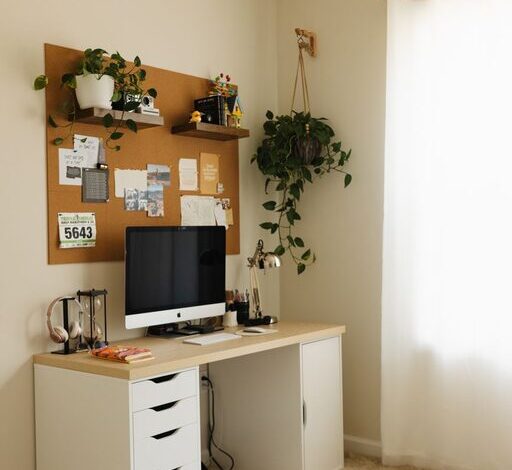
Small indoor plants can brighten the area and improve air quality. They also create a calming effect, which may help reduce stress.
Include Inspiring Elements
Place a few personal or motivational items near your desk, such as photos, art prints, or quotes. These can keep your spirits high during challenging workdays but avoid overcrowding your space.
Manage Your Time and Tasks
Use Calendars and Planners
Keep a physical or digital calendar in your workspace to schedule meetings, deadlines, and breaks. This helps you stay organized and manage your day effectively.
Set Up a To-Do List
Having a visible to-do list or task board motivates you to complete tasks and track progress.
Maintain a Healthy Work Environment
Take Breaks and Move Around
Schedule regular short breaks away from your desk to stretch and relax your eyes. This supports better concentration and overall well-being.
Keep Your Space Clean
Dust and clean your office area regularly to keep it inviting and hygienic.
Final Thoughts
Organizing a productive home office space is about combining comfort, functionality, and personal touches. By choosing the right location, investing in ergonomic furniture, keeping your desk organized, and creating an environment that motivates you, you set yourself up for success. Take time to regularly assess and adjust your workspace as your needs evolve, ensuring that it always supports your best work.